Architecture
This page explains how Rediacc works under the hood: the two-tool architecture, adapter detection, security model, and configuration structure.
Full Stack Overview
Traffic flows from the internet through a reverse proxy, into isolated Docker daemons, each backed by encrypted storage:
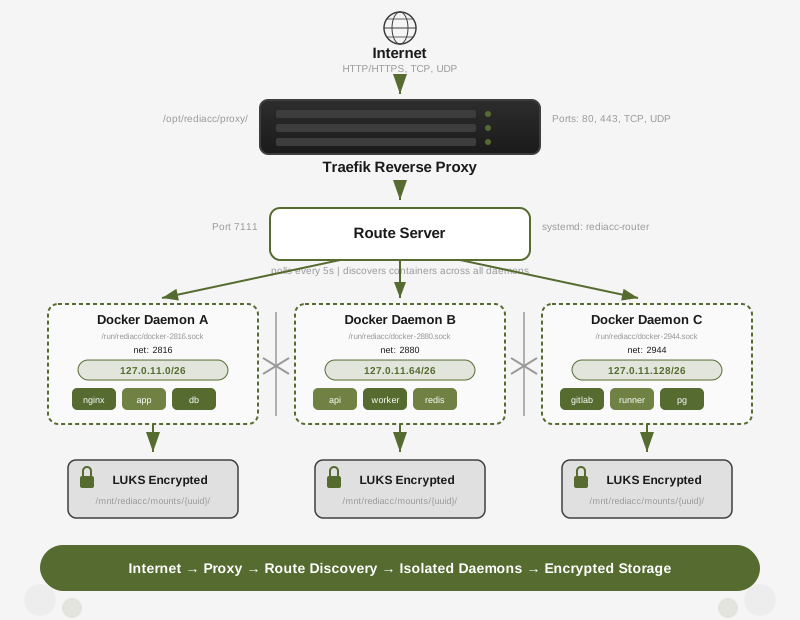
Each repository gets its own Docker daemon, loopback IP subnet (/26 = 64 IPs), and LUKS-encrypted BTRFS volume. The route server discovers running containers across all daemons and feeds routing configuration to Traefik.
Two-Tool Architecture
Rediacc uses two binaries that work together over SSH:
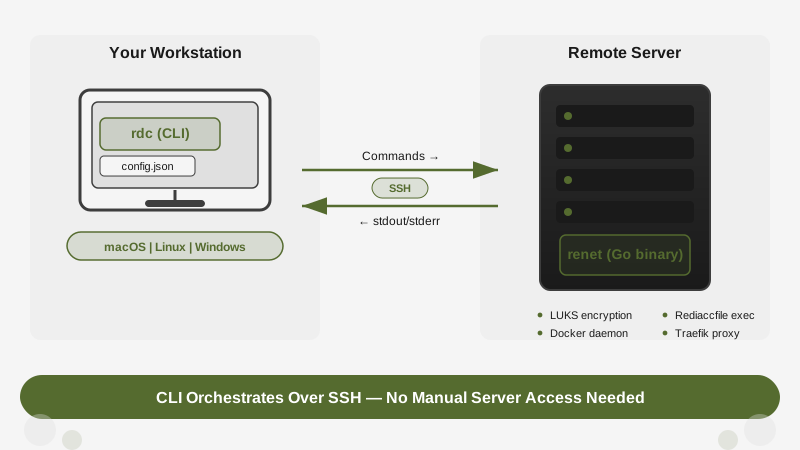
- rdc runs on your workstation (macOS, Linux, or Windows). It reads your local configuration, connects to remote machines over SSH, and invokes renet commands.
- renet runs on the remote server with root privileges. It manages LUKS-encrypted disk images, isolated Docker daemons, service orchestration, and reverse proxy configuration.
Every command you type locally translates to an SSH call that executes renet on the remote machine. You never need to SSH into servers manually.
For an operator-focused rule of thumb, see rdc vs renet. You can also use rdc ops to run a local VM cluster for testing — see Experimental VMs.
Config
All CLI state is stored in flat JSON config files under ~/.config/rediacc/.
Local Adapter (Default)
The default for self-hosted usage. All state lives in a config file on your workstation (e.g., ~/.config/rediacc/rediacc.json).
- Direct SSH connections to machines
- No external services required
- Single-user, single-workstation
- Default config is created automatically on first CLI use. Named configs are created with
rdc config init <name>
Cloud Adapter (Experimental)
Activated automatically when a config contains apiUrl and token fields. Uses the Rediacc API for state management and team collaboration.
- State stored in the cloud API
- Multi-user teams with role-based access
- Web console for visual management
- Set up with
rdc auth login
Note: Cloud adapter commands are experimental. Enable them by setting
REDIACC_EXPERIMENTAL=1.
Both adapters use the same CLI commands. The adapter only affects where state is stored and how authentication works.
The rediacc User
When you run rdc config machine setup, renet creates a system user called rediacc on the remote server:
- UID: 7111
- Shell:
/sbin/nologin(cannot log in via SSH) - Purpose: Owns repository files and runs Rediaccfile functions
The rediacc user cannot be accessed via SSH directly. Instead, rdc connects as the SSH user you configured (e.g., deploy), and renet executes repository operations via sudo -u rediacc /bin/sh -c '...'. This means:
- Your SSH user needs
sudoprivileges - All repository data is owned by
rediacc, not your SSH user - Rediaccfile functions (
up(),down()) run asrediacc
This separation ensures that repository data has consistent ownership regardless of which SSH user manages it.
Docker Isolation
Each repository gets its own isolated Docker daemon. When a repository is mounted, renet starts a dedicated dockerd process with a unique socket:
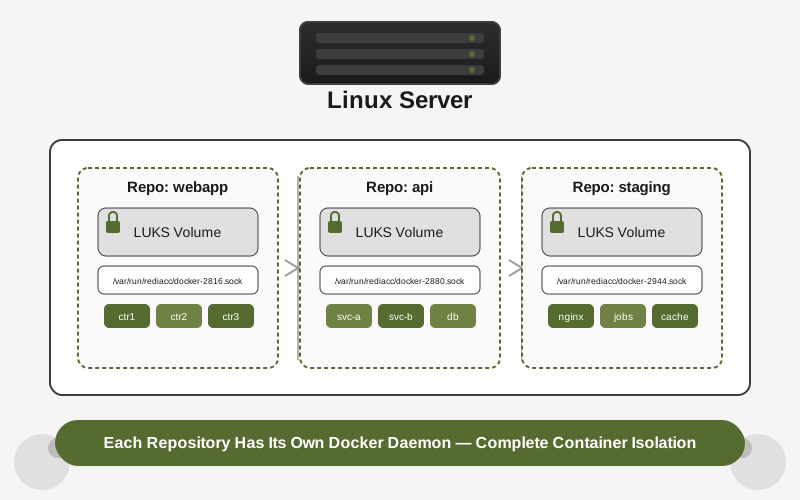
/var/run/rediacc/docker-{networkId}.sockFor example, a repository with network ID 2816 uses:
/var/run/rediacc/docker-2816.sockThis means:
- Containers from different repositories cannot see each other
- Each repository has its own image cache, networks, and volumes
- The host Docker daemon (if any) is completely separate
Rediaccfile functions automatically have DOCKER_HOST set to the correct socket.
LUKS Encryption
Repositories are LUKS-encrypted disk images stored on the server’s datastore (default: /mnt/rediacc). Each repository:
- Has a randomly generated encryption passphrase (the “credential”)
- Is stored as a file:
{datastore}/repos/{guid}.img - Is mounted via
cryptsetupwhen accessed
The credential is stored in your config file but never on the server. Without the credential, the repository data cannot be read. When autostart is enabled, a secondary LUKS keyfile is stored on the server to allow automatic mounting on boot.
Configuration Structure
Each config is a flat JSON file stored in ~/.config/rediacc/. The default config is rediacc.json; named configs use the name as the filename (e.g., production.json). Here is an annotated example:
{
  "id": "a1b2c3d4-e5f6-7890-abcd-ef1234567890",
  "version": 1,
  "ssh": {
    "privateKeyPath": "/home/you/.ssh/id_ed25519"
  },
  "machines": {
    "prod-1": {
      "ip": "203.0.113.50",
      "user": "deploy",
      "port": 22,
      "datastore": "/mnt/rediacc",
      "knownHosts": "203.0.113.50 ssh-ed25519 AAAA..."
    }
  },
  "storages": {
    "backblaze": {
      "provider": "b2",
      "vaultContent": { "...": "..." }
    }
  },
  "repositories": {
    "webapp": {
      "repositoryGuid": "a1b2c3d4-e5f6-7890-abcd-ef1234567890",
      "credential": "base64-encoded-random-passphrase",
      "networkId": 2816
    }
  },
  "nextNetworkId": 2880,
  "universalUser": "rediacc"
}
Key fields:
| Field | Description |
|---|---|
id | Unique identifier for this config file |
version | Config file schema version |
ssh.privateKeyPath | SSH private key used for all machine connections |
machines.<name>.user | SSH username for connecting to the machine |
machines.<name>.knownHosts | SSH host keys from ssh-keyscan |
repositories.<name>.repositoryGuid | UUID identifying the encrypted disk image |
repositories.<name>.credential | LUKS encryption passphrase (not stored on server) |
repositories.<name>.networkId | Determines the IP subnet (2816 + n*64), auto-assigned |
nextNetworkId | Global counter for assigning network IDs |
universalUser | Override the default system user (rediacc) |
This file contains sensitive data (SSH key paths, LUKS credentials). It is stored with
0600permissions (owner read/write only). Do not share it or commit it to version control.