Authentication
Rediacc supports multiple authentication methods:
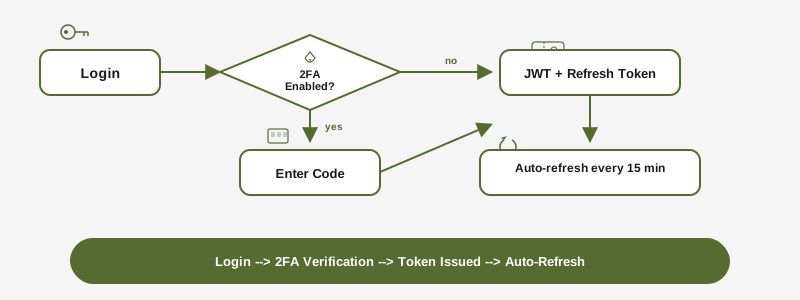
- Password: Traditional email + password login
- Magic Link: Passwordless login via email link (15-minute expiry)
- Two-Factor Authentication (2FA): TOTP-based with backup codes
When 2FA is enabled, login requires both your password (or magic link) and a 6-digit TOTP code.
API Tokens
API tokens authenticate machine-to-machine operations (CLI license activation, status checks).
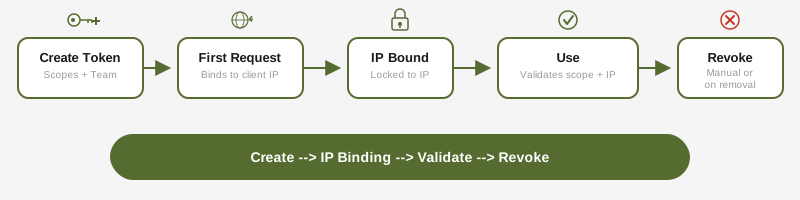
Scopes:
license:read— Query subscription and license statuslicense:activate— Activate machines and issue repository licensessubscription:read— Read subscription details
Security features:
- IP binding: first request locks the token to that IP address
- Team scoping: tokens can be restricted to a specific team
- Auto-revocation: tokens are revoked when the creator is removed from the organization
Creating a token:
# Via the portal: API Tokens > Create
# Token value is shown once -- save it securely
Device Code Flow
The CLI can authenticate on headless machines using the device code flow:
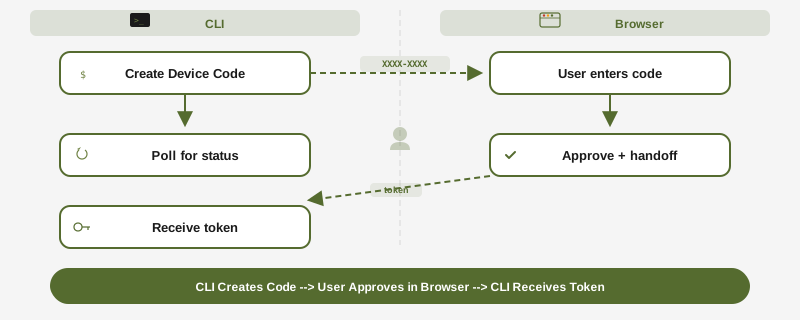
rdc config remote enable --headless
# Displays: Enter code XXXX-XXXX-XX at https://www.rediacc.com/account/authorize
# After approval, CLI receives credentials automaticallyConfig Storage
For encrypted, server-synced configuration, see Config Storage for the full guide. Config storage uses:
- Zero-knowledge encryption (server never sees plaintext)
- Passkey-based key derivation (WebAuthn + PRF)
- Rotating tokens with per-request rotation
Session Security
| Token Type | Lifetime | Storage | Refresh |
|---|---|---|---|
| Access Token (JWT) | 15 minutes | HttpOnly cookie | Auto via refresh token |
| Refresh Token | 7 days | HttpOnly cookie | Rotated on each use |
| Elevated Session | 10 minutes | Server-side | Triggered by re-authentication |
Elevated sessions are required for sensitive operations: password changes, email changes, 2FA setup, ownership transfers, and destructive admin actions.
Permission Model
Rediacc uses three independent permission layers:
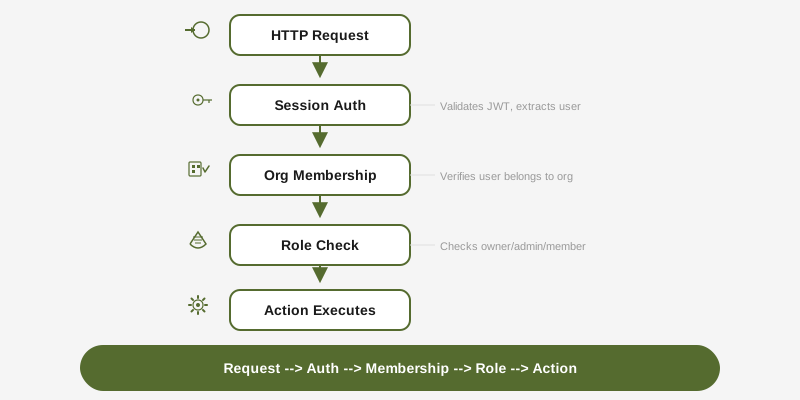
Layer 1: System Role — Determines access to system administration endpoints.
Layer 2: Organization Role — Controls what a user can do within their organization (owner, admin, member).
Layer 3: Team Role — Scopes access to specific team resources (team_admin, member). Organization owners and admins bypass team role checks.
Every API request passes through all applicable layers in sequence. A request to a team-scoped endpoint must satisfy session auth, org membership, and team access.
Update Channels
The CLI supports two release channels:
- stable (default): Thoroughly tested, recommended for production
- edge: Latest features, updated on every release
rdc update --channel edge      # Switch to edge
rdc update --channel stable    # Switch back to stable
rdc update --status            # Show current channel