Hub
The Hub provides per-user containerized environments behind OAuth authentication. Users visit a single URL, authenticate with any OAuth2 provider, and are transparently routed to their personal container. Containers are spawned on demand and managed automatically.
Everything is configured through docker-compose.yml labels. The Hub does not know or care what runs inside the containers — it handles authentication, routing, and lifecycle. Repos define behavior.
How It Works
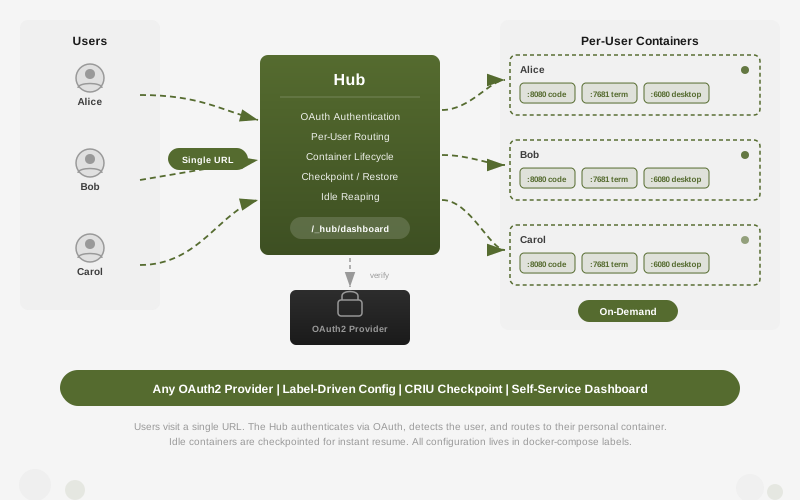
- A user visits
code.example.com - The Hub checks for a session cookie. If absent, the user is redirected to the configured OAuth2 provider (Nextcloud, Keycloak, GitHub, etc.)
- After authentication, the Hub identifies the user and looks up their container
- If no container exists, one is spawned on demand from the configured template
- The request is reverse-proxied to the user’s container
- The Hub determines which port to proxy to based on the hostname (e.g.,
code.-> port 8080,term.-> port 7681)
Idle containers are automatically stopped or checkpointed (CRIU) for instant resume on next login.
Quick Start
Add the Hub as a service in your repository’s docker-compose.yml:
services:
  hub:
    image: ubuntu:24.04
    entrypoint: /usr/bin/renet
    command:
      - hub
      - start
      - --docker-socket=/var/run/rediacc/docker-${REDIACC_NETWORK_ID}.sock
      - --network-id=${REDIACC_NETWORK_ID}
      - --base-domain=${HUB_DOMAIN}
      - --workspace-dir=${REDIACC_WORKING_DIR}/workspaces
    env_file:
      - ./hub.env
    volumes:
      - /usr/lib/rediacc/renet/current/renet:/usr/bin/renet:ro
      - /var/run/rediacc/docker-${REDIACC_NETWORK_ID}.sock:/var/run/rediacc/docker-${REDIACC_NETWORK_ID}.sock
      - ./workspaces:${REDIACC_WORKING_DIR}/workspaces
    labels:
      - "traefik.enable=true"

      # Route mapping: subdomain prefix -> port on user containers
      - "rediacc.hub.route.code=8080"
      - "rediacc.hub.route.term=7681"
      - "rediacc.hub.route.desktop=6080"

      # Container template
      - "rediacc.hub.image=ghcr.io/your-org/devcontainer:latest"
      - "rediacc.hub.command=start-desktop.sh & ttyd --writable --port 7681 bash & exec openvscode-server --host $${SERVICE_IP} --port 8080"
      - "rediacc.hub.user=vscode"

      # Traefik routes (one per subdomain)
      - "traefik.http.routers.hub-code.rule=Host(`code.${HUB_DOMAIN}`)"
      - "traefik.http.routers.hub-code.entrypoints=websecure"
      - "traefik.http.routers.hub-code.tls.certresolver=letsencrypt"
      - "traefik.http.services.hub-code.loadbalancer.server.port=7112"
      - "traefik.http.routers.hub-term.rule=Host(`term.${HUB_DOMAIN}`)"
      - "traefik.http.routers.hub-term.entrypoints=websecure"
      - "traefik.http.routers.hub-term.tls.certresolver=letsencrypt"
      - "traefik.http.services.hub-term.loadbalancer.server.port=7112"
      - "traefik.http.routers.hub-desktop.rule=Host(`desktop.${HUB_DOMAIN}`)"
      - "traefik.http.routers.hub-desktop.entrypoints=websecure"
      - "traefik.http.routers.hub-desktop.tls.certresolver=letsencrypt"
      - "traefik.http.services.hub-desktop.loadbalancer.server.port=7112"
Create hub.env with your OAuth2 provider credentials:
HUB_DOMAIN=example.com
HUB_OAUTH_CLIENT_ID=your-client-id
HUB_OAUTH_CLIENT_SECRET=your-client-secret
HUB_OAUTH_AUTHORIZE_URL=https://auth.example.com/authorize
HUB_OAUTH_TOKEN_URL=https://auth.example.com/token
HUB_OAUTH_USERINFO_URL=https://auth.example.com/userinfo
HUB_OAUTH_USERINFO_PATH=preferred_username
HUB_SESSION_SECRET=64-character-hex-string
Deploy with rdc repo up.
Configuration
All Hub configuration lives in compose labels on the Hub service itself. No configuration files inside the Hub binary.
Route Mapping
Map subdomain prefixes to ports on user containers. The Hub reads these labels to know where to proxy each request.
| Label | Description | Example |
|---|---|---|
rediacc.hub.route.{prefix} | Maps {prefix}.{domain} to this port on the user’s container | rediacc.hub.route.code=8080 |
You can define any number of routes. The prefix is matched against the hostname’s first segment:
labels:
  - "rediacc.hub.route.code=8080"      # code.example.com -> :8080
  - "rediacc.hub.route.term=7681"      # term.example.com -> :7681
  - "rediacc.hub.route.desktop=6080"   # desktop.example.com -> :6080
  - "rediacc.hub.route.jupyter=8888"   # jupyter.example.com -> :8888
Each route also needs a matching Traefik router pointing to the Hub’s port (7112). The Hub handles the per-user routing internally.
Container Template
Define what user containers look like. The Hub reads these labels and uses them when spawning a new container for a user.
| Label | Description | Default |
|---|---|---|
rediacc.hub.image | Container image | Value of --container-image flag |
rediacc.hub.command | Startup command (bash -c compatible) | none |
rediacc.hub.user | Container user (non-root recommended) | vscode |
rediacc.hub.workspace | Workspace mount point inside container | /workspace |
rediacc.hub.shm_size | Shared memory size in bytes | 1073741824 (1 GB) |
The command label supports ${SERVICE_IP} expansion, which is replaced with the container’s assigned loopback IP at spawn time.
labels:
  - "rediacc.hub.image=ghcr.io/my-org/dev-env:latest"
  - "rediacc.hub.command=exec jupyter lab --ip=$${SERVICE_IP} --port=8888 --no-browser"
  - "rediacc.hub.user=1000:1000"
  - "rediacc.hub.workspace=/home/jovyan/work"
Tip: Use
$$for literal$in compose labels to prevent premature env var expansion by Docker Compose.
Resource Limits
Set per-user resource limits to prevent any single user from consuming all host resources.
| Label | Description | Example |
|---|---|---|
rediacc.hub.limits.cpu | CPU limit (cores) | 2 |
rediacc.hub.limits.memory | Memory limit | 4g |
labels:
  - "rediacc.hub.limits.cpu=2"
  - "rediacc.hub.limits.memory=4g"
Lifecycle Hooks
Run commands inside the user container at specific lifecycle points.
| Label | When it runs | Example |
|---|---|---|
rediacc.hub.hook.on_create | After container is created (first login) | Clone repos, install dependencies |
rediacc.hub.hook.on_start | After container starts or restores | Mount secrets, refresh tokens |
rediacc.hub.hook.on_idle | Before container is stopped or checkpointed | Save state, push changes |
labels:
  - "rediacc.hub.hook.on_create=git clone https://github.com/org/repo /workspace/project"
  - "rediacc.hub.hook.on_start=echo Welcome back, $HUB_USER"
  - "rediacc.hub.hook.on_idle=cd /workspace && git stash"
Checkpoint / Restore
When enabled, idle containers are checkpointed using CRIU instead of being stopped. On next login, the container is restored from the checkpoint in seconds, preserving the exact state: open files, running processes, terminal sessions.
| Label | Description | Default |
|---|---|---|
rediacc.hub.checkpoint | Enable CRIU checkpoint for user containers | false |
Also pass --checkpoint when starting the Hub:
command:
  - hub
  - start
  - --checkpoint
  - ...other flags...
Note: Checkpoint/restore requires the CRIU binary to be available on the host and the container must run in host network mode (the default for Rediacc services).
Access Control
Restrict who can use the Hub and who has admin privileges.
| Label | Description | Example |
|---|---|---|
rediacc.hub.allowed_groups | Comma-separated groups allowed to use the Hub | developers,ops |
rediacc.hub.admin_users | Comma-separated admin usernames | alice,bob |
Admin users can see and manage all containers in the dashboard. Regular users see only their own.
Ephemeral Mode
By default, user workspaces are persistent (survive container restarts). Ephemeral mode provides a clean environment on every login, useful for demos, training, or CI.
| Label | Description | Default |
|---|---|---|
rediacc.hub.mode | persistent or ephemeral | persistent |
labels:
  - "rediacc.hub.mode=ephemeral"
In ephemeral mode, the workspace uses tmpfs (RAM-backed) and the container is automatically removed when stopped.
Multi-Template Support
Offer multiple environment types. Users can choose their template on first login or switch via the dashboard.
labels:
  # Default template
  - "rediacc.hub.template.default=fulldev"

  # Full development environment
  - "rediacc.hub.template.fulldev.image=ghcr.io/org/devcontainer:latest"
  - "rediacc.hub.template.fulldev.command=start-desktop.sh & ttyd ... & exec openvscode-server ..."
  - "rediacc.hub.template.fulldev.description=Full development environment with VS Code, terminal, and desktop"

  # Lightweight option
  - "rediacc.hub.template.lite.image=ghcr.io/org/devcontainer:lite"
  - "rediacc.hub.template.lite.command=exec openvscode-server --host $${SERVICE_IP} --port 8080"
  - "rediacc.hub.template.lite.description=VS Code only (lightweight, faster startup)"
OAuth Setup
The Hub works with any standard OAuth2 provider. Configuration is via environment variables, not compose labels (secrets should not be in labels).
| Variable | Description | Required |
|---|---|---|
HUB_OAUTH_CLIENT_ID | OAuth2 client ID | Yes |
HUB_OAUTH_CLIENT_SECRET | OAuth2 client secret | Yes |
HUB_OAUTH_AUTHORIZE_URL | Provider’s authorize endpoint | Yes |
HUB_OAUTH_TOKEN_URL | Provider’s token endpoint | Yes |
HUB_OAUTH_USERINFO_URL | Provider’s userinfo endpoint | Yes |
HUB_OAUTH_USERINFO_PATH | Dot-path to extract username from JSON response | Yes |
HUB_OAUTH_REDIRECT_URI | Override callback URL (auto-computed if empty) | No |
HUB_OAUTH_SCOPES | Additional scopes (space-separated) | No |
HUB_SESSION_SECRET | 32+ byte hex string for cookie signing | Recommended |
Provider Examples
Nextcloud:
HUB_OAUTH_AUTHORIZE_URL=https://cloud.example.com/apps/oauth2/authorize
HUB_OAUTH_TOKEN_URL=https://cloud.example.com/apps/oauth2/api/v1/token
HUB_OAUTH_USERINFO_URL=https://cloud.example.com/ocs/v2.php/cloud/user?format=json
HUB_OAUTH_USERINFO_PATH=ocs.data.id
Keycloak:
HUB_OAUTH_AUTHORIZE_URL=https://auth.example.com/realms/master/protocol/openid-connect/auth
HUB_OAUTH_TOKEN_URL=https://auth.example.com/realms/master/protocol/openid-connect/token
HUB_OAUTH_USERINFO_URL=https://auth.example.com/realms/master/protocol/openid-connect/userinfo
HUB_OAUTH_USERINFO_PATH=preferred_username
GitHub:
HUB_OAUTH_AUTHORIZE_URL=https://github.com/login/oauth/authorize
HUB_OAUTH_TOKEN_URL=https://github.com/login/oauth/access_token
HUB_OAUTH_USERINFO_URL=https://api.github.com/user
HUB_OAUTH_USERINFO_PATH=login
HUB_OAUTH_SCOPES=read:user
The HUB_OAUTH_USERINFO_PATH is a dot-separated path into the JSON response. For nested objects like Nextcloud’s {"ocs":{"data":{"id":"alice"}}}, use ocs.data.id.
Dashboard
The Hub includes a self-service dashboard at /_hub/dashboard. It shows:
- All running environments with their status
- Service links (one click to open code, terminal, or desktop)
- Idle timers and resource usage
- Start/stop controls
- Admin users can see and manage all containers
Access the dashboard by visiting https://code.example.com/_hub/dashboard after authenticating.
Examples
Development Environment (VS Code + Terminal + Desktop)
A full development environment with OpenVSCode Server, a web terminal (ttyd), and a noVNC desktop:
labels:
  - "rediacc.hub.route.code=8080"
  - "rediacc.hub.route.term=7681"
  - "rediacc.hub.route.desktop=6080"
  - "rediacc.hub.image=ghcr.io/your-org/devcontainer:latest"
  - "rediacc.hub.command=start-desktop.sh & ttyd --writable --port 7681 bash & exec openvscode-server --host $${SERVICE_IP} --port 8080 --without-connection-token"
  - "rediacc.hub.user=vscode"
  - "rediacc.hub.limits.cpu=2"
  - "rediacc.hub.limits.memory=4g"
  - "rediacc.hub.hook.on_create=git clone https://github.com/org/project /workspace/project"
Jupyter Notebook Environment
A data science environment with JupyterLab:
labels:
  - "rediacc.hub.route.notebook=8888"
  - "rediacc.hub.image=jupyter/datascience-notebook:latest"
  - "rediacc.hub.command=exec jupyter lab --ip=$${SERVICE_IP} --port=8888 --no-browser --NotebookApp.token='' --NotebookApp.password=''"
  - "rediacc.hub.user=1000:100"
  - "rediacc.hub.workspace=/home/jovyan/work"
  - "rediacc.hub.limits.cpu=4"
  - "rediacc.hub.limits.memory=8g"
Simple Web Application
A single-service environment for a web framework:
labels:
  - "rediacc.hub.route.app=3000"
  - "rediacc.hub.image=node:22-alpine"
  - "rediacc.hub.command=cd /workspace && npm install && exec npm run dev -- --host $${SERVICE_IP}"
  - "rediacc.hub.user=1000:1000"
  - "rediacc.hub.mode=ephemeral"
Related Guides
- Services — Rediaccfile lifecycle, compose patterns
- Networking — Docker labels, Traefik routing, TLS certificates
- Backup & Restore — Workspace persistence and recovery
- Development Environments — Production cloning for dev environments